Embracing Gemini: How Association Executives Can Future-Proof Their Gmail Strategies Now

Updated: May 6

Gmail is the #1 email inbox association members are using, so we need to be aware of what Gemini is doing to the inbox.
The good news is you still have time to make changes, but it is time to accelerate.
Update: Here's our download on what changes to work on, and my podcast discussion on the Member Engagement Show on the topic.
Here's What You Need to Know to Future-Proof Your Gmail Strategies Now
After many rounds of testing both free an paid gemini instances in gmail, here is what we found. Our goal is to help you know what is coming so you have time to prepare, and you can impress your boss with your forward planning.
Gemini Free Version: AI Overview
As of today, Gemini is summarizing personal emails in Gmail, not marketing emails. If you click on a long personal email you will see at the top an AI Overview box that gives 3 bullet points on what the email says.

In our testing of our clients member marketing emails, Gemini AI overview hasn’t become an option for any of their emails = member newsletters, annual conference promotions, renewal emails, etc.
But, everyone is predicting that it will be soon.
Gemini Paid Version
Summarize This Email
If you purchase the cheapest version of Gemini ($7.99 a month), then you get a Gemini support in gmail.
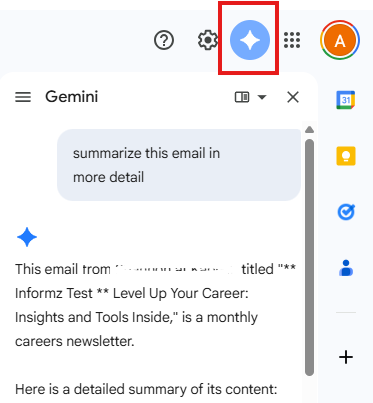
When you have any email open, you can ask Gemini “summarize this email for me” or any other question you might have.
This works just like Copilot, but in Gmail for now you have to pay for it. Thus, that is a barrier to members adopting and using it, but they might be!
AI Inbox
After an hour of research, and upgrading my Gemini plan to attempt to get this AI inbox I keep reading about to do testing. I still couldn’t get it! Gemini finally told me “AI Inbox is currently available only to select trusted testers in the US.”
Here’s What I Know
People will have to pay for it, around $20 a month.
People who are testing it, and writing articles on what is happening with it, say it is going to change the way we email. So, we need to be aware of it.
According to Folderly: The new AI Inbox acts as a semantic gatekeeper. It evaluates all incoming messages to create a personalized briefing, but it focuses on specific criteria to decide what to surface:
Prioritization: It scans for high-stakes emails like bills, appointments, and messages from "VIPs" (people you contact frequently).
Actionability: It prioritizes emails that imply a "to-do," such as a request for a meeting or a task from a colleague.
Clutter Filtering: It specifically filters out generic promotional emails and "fluff," making them less visible in the AI-generated summary view.
AI is continuing to determining deliverability
We’ve been saying for years that we need to apply email best practices to ensure we make it in the inbox. AI is accelerating that need.
Inbox Placement Now Depends on Relevance and Relationship
Gmail’s new AI Inbox prioritizes messages based on signals like:
How often a recipient engages with the sender
Whether the sender feels “important” or trusted
Whether the message implies urgency, relevance, or an action be taken
This means inbox visibility is increasingly earned over time, rather than guaranteed with each send.
High-volume, low-relevance programs will struggle. Brands that consistently send messages that customers open, read, and act on will rise to the top.
Meaning: we need to asses our email engagement. What are your click, conversion, unsubscribe, bounce, and domain block rates? If our engagement is poor, it is going to be harder to surface to the top of the inbox.
But don’t fret, AI inbox isn’t available to everyone yet. But we should future proof our gmail strategies to prepare for it.
How Should We Prepare?
At the end of the day, all this AI acceleration is doing is forcing us to do email best practices faster. Here are the foundational email best practices that should be applied:
Prioritize relevance over volume. Promotional emails with low engagement have the potential to be downgraded if Gemini deems they lack context or prior engagement
Lead every email with your value proposition in the first 1–2 sentences
Keep it simple — bullet points, headers, and a single clear CTA
Segment your list relevant emails to the right people will always outperform blasts
Make sure you have a compelling welcome / onboarding series to new members! If they click your first email it increases the likelihood that your emails will staying in that person’s inbox by 85% (Jay Schwedelson)
Make sure you have an unsubscribe and email preference center in your footer that work (double check those links!)
Make sure your SPF, DKIM, and DMARC authentication is set up correctly (if you're not sure, check it via ZeroBounce One today)
As Gemini is more widely adopted, we will specify what is free and what people have to pay for to get. Because some association members will probably err on the side of only using the free version, others will be using the paid versions.
Ways Email Maven Can Help
Audit your associations emails to determine what needs to change to ensure you show up in the inbox. This can include doing inbox placement testing and generating a deliverability score.
Custom trainings to help your internal team, or National & Chapter leaders to get on the same page about email best practices. Email is a team sport, let’s chat about how to get the team up to date.
30 minute free chat, no strings attached for real. Let’s talk about what you are thinking, what your challenges are. Things are moving quickly I’m here to learn with you too, let’s connect.



Comments